Diagnosis Master & Severity Levels
Every ICD-10 diagnosis in MetahOS can carry a severity level — Critical, High, Medium or Low. The level is shown as a badge wherever a diagnosis is picked, and it is what reports such as the MMU Beneficiary Report use to decide which patients are high-risk.
Severity belongs to the diagnosis, not to one patient: setting Type 2 diabetes mellitus to High sets it for everyone, everywhere.
At a glance
fa-list | Diagnosis master | Care → Diagnosis lists every ICD-10 diagnosis.
fa-sliders | Set the severity | Critical, High, Medium, Low or Not classified.
fa-user-md | Doctor adds a diagnosis | The badge shows beside it in the picker.
fa-question-circle | No severity yet? | Optionally, the doctor is asked to set one.
fa-history | Every change recorded | Who changed it, when, and from where.
The diagnosis master
Open Care → Diagnosis (needs access to the Diagnosis master). The list holds the full ICD-10 catalogue; diagnosis names and codes are read-only.
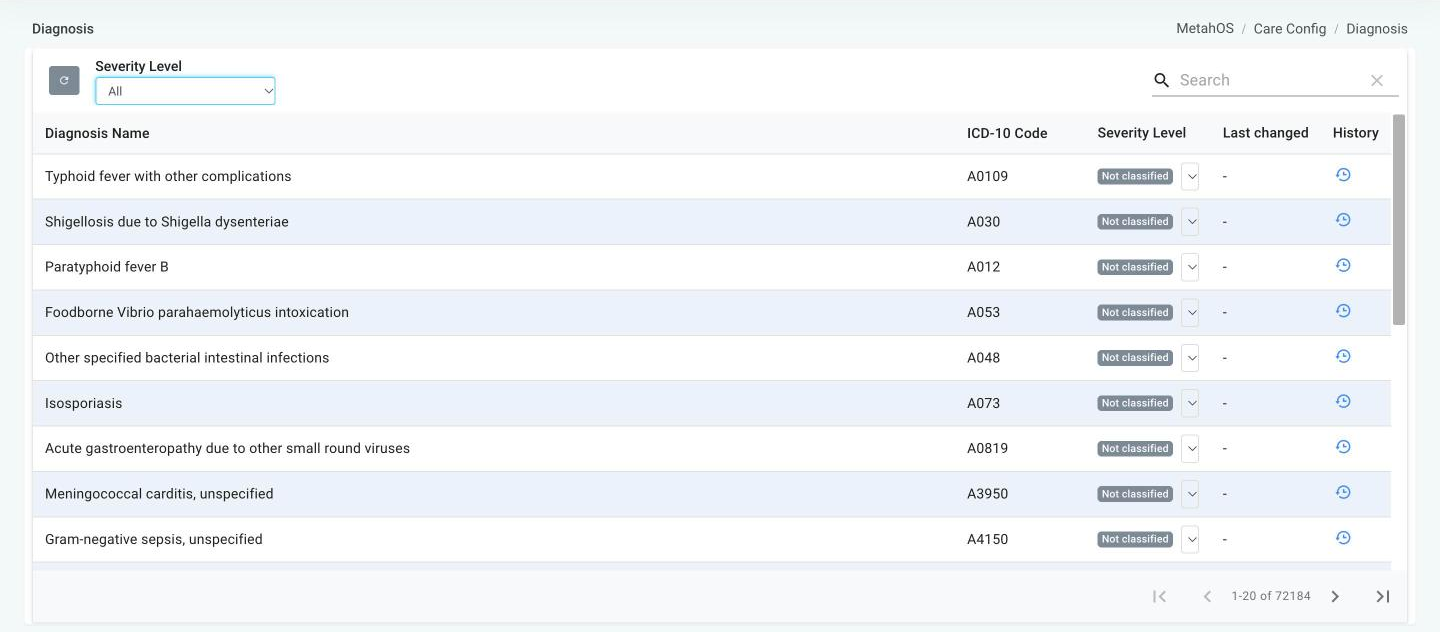
| Column | What it shows |
|---|---|
| Diagnosis Name | The ICD-10 description. Sortable. |
| ICD-10 Code | The code. Sortable. |
| Severity Level | A coloured badge and a dropdown to change it. |
| Last changed | Who last changed the severity, and when. |
| History | A clock icon that opens the change history. |
Search by name or code, and use the Severity Level filter (All, Not classified, Critical, High, Medium, Low) to find diagnoses that still need a level.
Setting a severity
Choose a level from the row's dropdown. It saves immediately. Choosing Not classified clears the level.
| Level | Badge |
|---|---|
| Critical | Red |
| High | Amber |
| Medium | Blue |
| Low | Green |
| Not classified | Grey |
This screen is the only place a severity can be changed or cleared once set. If someone else changed the same diagnosis while you had the list open, you are asked to reload and try again.
Change history
The clock icon opens Severity history for that diagnosis, newest first: the date and time, who made the change, the previous and new severity, and where it was made — Diagnosis master or Consultation.
Badges in the diagnosis pickers
Wherever a diagnosis is chosen, each option and each added diagnosis shows a grey ICD code badge and, if one is set, the coloured severity badge:
- the Working Diagnosis in the OP consultation screen;
- the IP prescription diagnosis, IP working diagnosis and admission-from-OPD diagnosis;
- the diagnosis field in forms built with the Form Builder.
Diagnoses added by voice and diagnoses loaded from saved records show the badges too. A diagnosis without a severity shows only its code. Diagnoses typed in by hand, outside the ICD-10 list, have neither.
Asking doctors to classify
Your organisation can choose to ask for a severity at the moment a diagnosis is used. When this is turned on and a doctor adds a diagnosis that has no severity yet, a Set risk level window appears:
This diagnosis has no risk level yet. Choosing one updates it for everyone, and it will be used in reporting.
- Pick Critical, High, Medium or Low, then Save & add. The diagnosis is added and the level is saved for everyone.
- Or choose Skip for now. The diagnosis is added without a level, and you won't be asked about that diagnosis again until the page is reloaded.
From the consultation, a doctor can only fill in a missing severity — never change one. If a colleague set it a moment earlier, you'll be told it already has a risk level.
Turning it on
Two site settings control the prompt, and both are off by default. Ask your MetahOS administrator to turn them on:
| Setting | Effect |
|---|---|
| Prompt for diagnosis risk | Shows the Set risk level window to users who have access to the Diagnosis master. |
| Let doctors classify | Together with the first setting, lets any doctor (other than referral doctors) answer the window. |
The badges are shown whether or not the prompt is turned on.
Classify the common diagnoses first
Filter the master by Not classified and work through the diagnoses your clinics use most. Turning on the prompt then fills in the long tail as doctors meet it.
info
Severity levels are for staff and reporting only. They are never shown to patients, and a patient's record stores the diagnosis itself, not its severity.