MMU Beneficiary Report
The MMU Beneficiary Report brings together everything recorded for the beneficiaries screened by your Mobile Medical Units (MMUs) — vitals, investigations, diagnoses, high-risk conditions, medicines and ABHA status — in one report you can read on screen or download.
Open it from Camps → MMU Beneficiary Report. It needs access to the MMU Beneficiary Report, and only covers the authorities you can access.
At a glance
fa-calendar | Choose the period | Defaults to the 1st of this month to today.
fa-ambulance | Pick MMUs or camps | Leave empty for all, or narrow to some.
fa-sitemap | Choose the grouping | Beneficiary-wise, MMU-wise or Date-wise.
fa-table | Generate Report | Totals, then one card per group.
fa-download | Download | Excel or CSV of the full cohort.
How an MMU is recognised
An MMU is a site whose name starts with MMU, a number and an underscore — for example MMU01_Bengaluru is read as MMU1. MMUs are the lowest level of the DLC → ALC → LO → MMU hierarchy used by the analytics dashboards.
Name your MMU sites consistently
Only sites named MMU<number>_… are included when you filter by MMU. A site named differently can still be reported by choosing it under Camp.
Filters
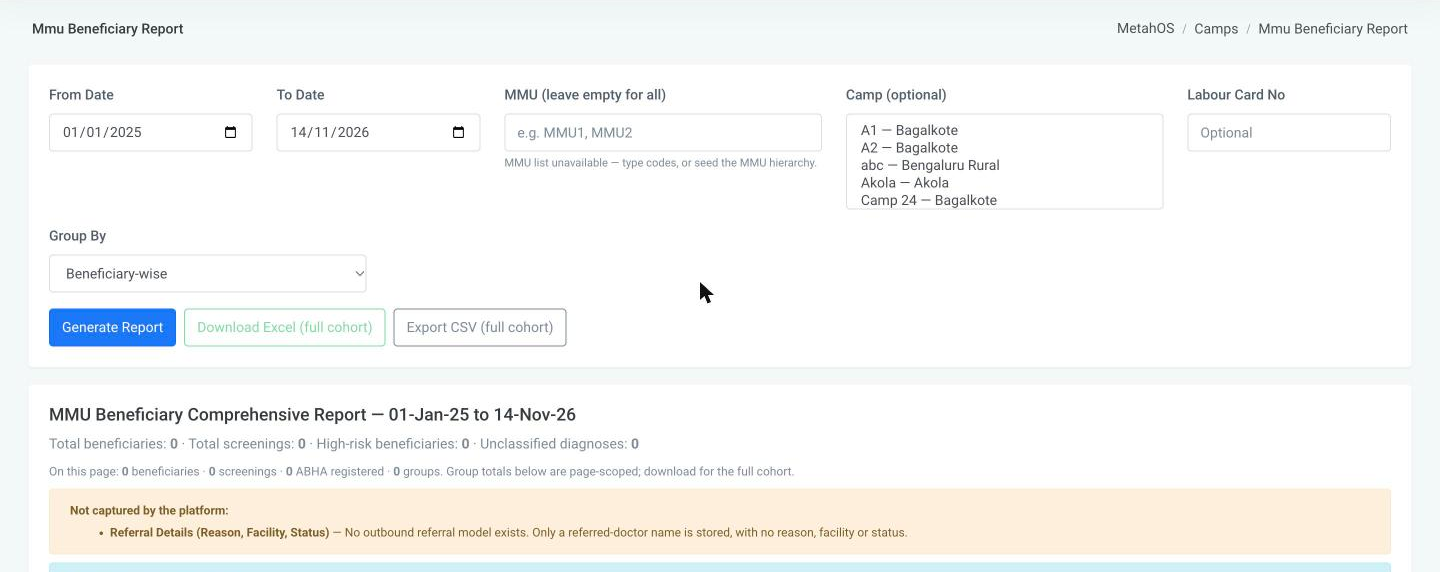
| Filter | Use |
|---|---|
| From Date / To Date | The screening period. |
| MMU | One or more MMUs, shown with their vehicle registration number. Leave empty for all. If the MMU list cannot be loaded, type the codes instead (for example MMU1, MMU2). |
| Camp (optional) | One or more camps, shown as name — village. |
| Labour Card No (optional) | One beneficiary's screenings. |
| Group By | Beneficiary-wise (default), MMU-wise or Date-wise. |
Click Generate Report.
Reading the report
A summary card at the top gives the period and four totals: beneficiaries, screenings, high-risk beneficiaries and unclassified diagnoses.
Below it, each group is a card with its own counts — beneficiaries, screenings, abnormal vitals and ABHA registrations — and a table of screenings:
| Column | Shows |
|---|---|
| MMU, Date | Where and when the screening took place. |
| Labour Card | The card number, with a red Expired badge if the card has expired. |
| UHID, Beneficiary | The patient. |
| Vitals | Each vital marked abnormal, normal or not checked. |
| Investigations | Each test parameter with its value, unit and reference range. |
| Diagnosis | The diagnosis and the working diagnosis. |
| High-Risk Diseases | Diagnoses rated Critical or High, with their codes. |
| Medicines | Name, strength, dosage and quantity. |
| ABHA | Whether the beneficiary has an ABHA, and the number. |
The table shows 50 screenings per page.
What "high-risk" means
A disease counts as high-risk when its diagnosis is rated Critical or High in the diagnosis master. Diagnoses that have not been rated are counted separately as unclassified — they are not assumed to be low risk. Rating the common diagnoses makes this report more complete.
Read these numbers with care
The report itself carries these notes:
- Medicines and vitals are linked to a screening by calendar day.
- Vitals recorded before range checking was introduced are shown as not checked rather than normal, because they were never compared with a range.
- High-risk diseases are matched by diagnosis name.
- Referral details (reason, facility, status) are not captured by the platform and so are not in the report.
Downloading
| Button | Produces |
|---|---|
| Download Excel (full cohort) | A workbook with sheets for Beneficiaries, Vitals, Investigations, Medicines, Clinical, ABHA, High Risk and Data Notes. |
| Export CSV (full cohort) | One row per screening, with every column in a single sheet — including camp, camp location, screening number, beneficiary type, gender, age, mobile, ABHA address, symptoms and allergies. |
Both cover the whole filtered cohort, not just the page on screen, up to 5,000 screenings. If there are more, the download is cut off and says so — narrow the date range or the MMU filter and download in parts.