Welcome to the MetahOS Guide
This is your complete, hands-on manual for MetahOS — the Healthcare Operating System. Whether you run the front desk, a lab, the pharmacy, an operating theatre, or the whole hospital, you'll find step-by-step workflows and a visual "Workflow at a glance" diagram on almost every page.
New here? Take it in three steps
- Read What is MetahOS to understand what the platform does.
- Skim The platform at a glance to see how the modules fit together.
- Pick your area from the sidebar — each module opens with a diagram, then detailed how-to pages. Hover any diagram node for a quick explanation.
What is MetahOS
MetahOS is a Healthcare Operating System that runs across the continuum of care — from a patient's first enquiry, through consultation, diagnostics, admission and billing, all the way to follow-up and engagement. It brings every department onto one platform so your teams can focus on treating patients, not wrestling with technology.
Check out our health stack:
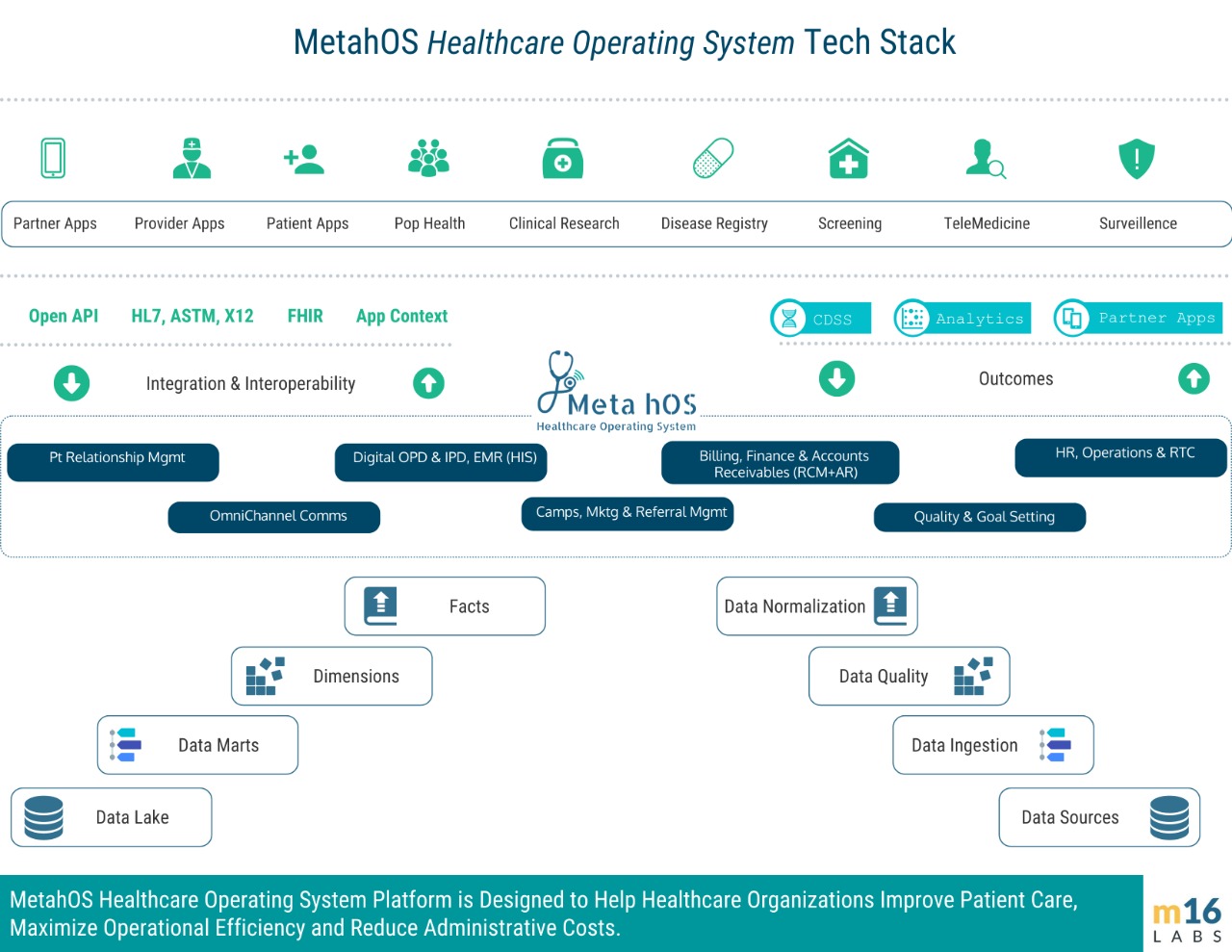
For hospitals
A single platform for OPD, IPD, OT, diagnostics, pharmacy, HR, inventory, billing and more:
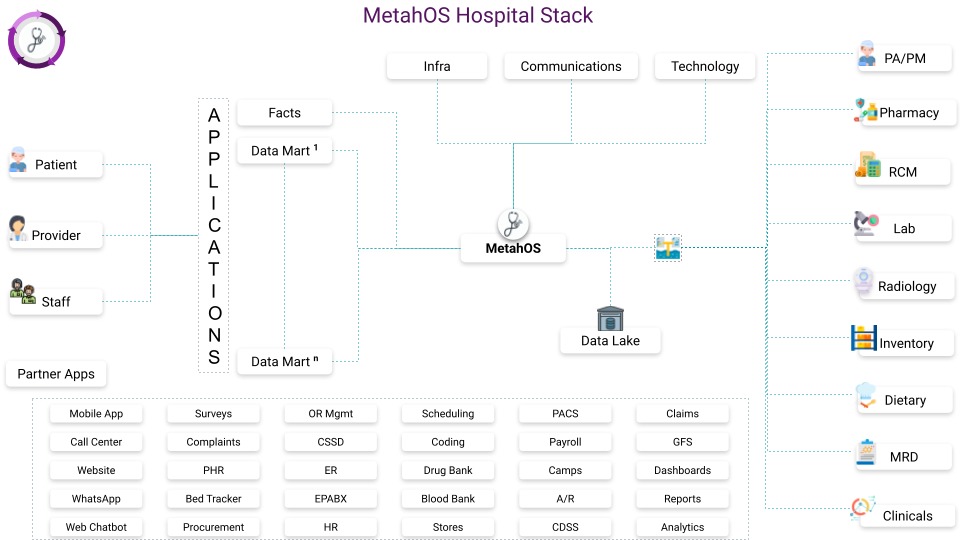
Build your own EMR
As a practising doctor you can build your own EMR on MetahOS — arrange the consultation screen, macros and care plans around how you work. The clinician section walks you through it.
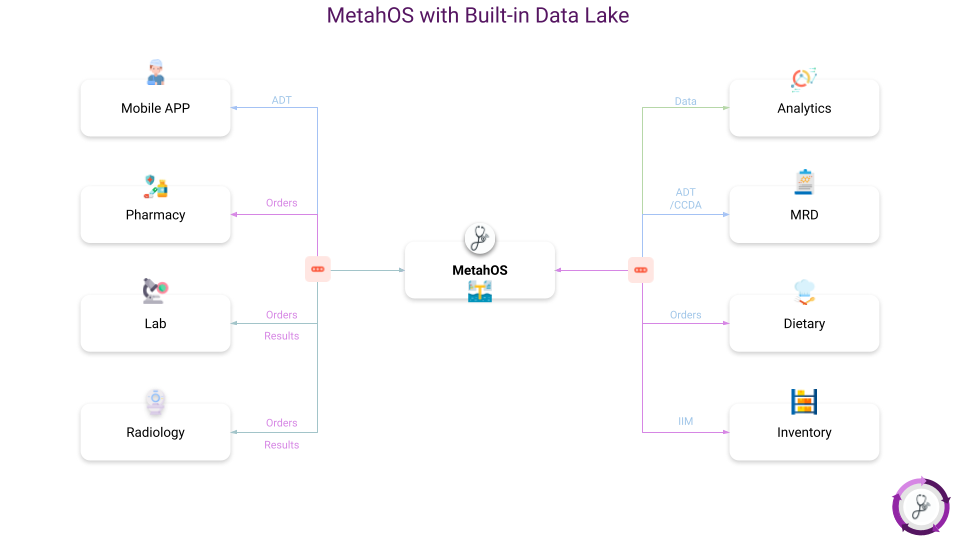
Built-in Data Lake
MetahOS ships with a full Data Lake so you can integrate every existing system in your institution and augment it with new capabilities — no rip-and-replace required.
The platform at a glance
Here's how the major modules connect — the patient moves through care delivery, which feeds operations, growth and integration:
flowchart TD
  subgraph CARE["fa:fa-heartbeat Care delivery"]
    direction LR
    P(["fa:fa-user Patient"]) --> NAV["fa:fa-calendar Patient navigation"] --> CLIN["fa:fa-user-md Clinician and OT"] --> DX["fa:fa-flask Lab and Radiology"]
  end

  subgraph OPS["fa:fa-cog Operations"]
    direction LR
    BILL["fa:fa-money Billing"] ~~~ INV["fa:fa-cubes Facility and Inventory"] ~~~ HR["fa:fa-users Human Resources"]
  end

  subgraph GROW["fa:fa-bullhorn Growth and engagement"]
    direction LR
    SALES["fa:fa-line-chart Sales and CRM"] ~~~ MKT["fa:fa-comment Marketing and Camps"] ~~~ QTV["fa:fa-tv Queue TV"]
  end

  subgraph INT["fa:fa-hospital-o Integration and insight"]
    direction LR
    ABDM["fa:fa-hospital-o ABDM and ABHA"] ~~~ AN["fa:fa-line-chart Analytics dashboards"]
  end

  CARE --> OPS --> GROW
  OPS --> INT
How this guide is organized
This guide is versioned to match the product — you're reading v1.0.77. Every module section opens with a Workflow at a glance diagram, followed by task-focused pages with the exact buttons, fields and permissions.
The sidebar is grouped by how a healthcare team actually works:
- Patient journey — Patient Navigation, Pre-Doctor / Secretary, Clinician, IP, OT, MRD, Referral
- Diagnostics — Laboratory & Diagnostics, Radiology
- Operations — Human Resources, Facility & Inventory, Billing & Payments
- Growth & engagement — Sales & CRM, Marketing, Queue TV, Notifications, Camps
- Integration & insight — ABDM / ABHA, Analytics & AI Dashboards
- Build & extend — Form Builder, Authentication, Security, Workflow Engine, Integration with MetahOS
How to read the diagrams
Each Workflow at a glance diagram uses icons to show the steps and decisions in a flow. Hover over any node for a one-line explanation, and toggle the moon/sun in the top bar to switch between light and dark.
What's new in v1.0.77
Since v1.0.70, the biggest changes are in the laboratory, the sales module and access control:
- Laboratory — per-status pending worklists with their own permissions, a rejected-sample status, single-stage accession and a barcode Lab Scanner, outsourced tests merged into the ordinary report modal (and reportable in-house), lab orders raised during a consultation and billed onto the consultation bill, Prev/Next navigation through a worklist, audit history on results, and bulk report export as a ZIP.
- Sales & CRM — Phase 3 adds proforma invoices with approvals and advances, delivery challans and notes, returns and credit notes, price lists, discount approval, credit limits and a reports tab.
- Security & access control — bucket authorities for assigning sites as a bundle, and system-generated doctor user IDs that doctors can sign in with.
- Patient records — structured allergies with severity and status history, next-of-kin details, identity-document expiry tracking, and a full patient edit history.
- Clinician — age- and gender-aware vitals reference ranges, and consultations that can be booked without a named doctor.
- Facility & Inventory — batch expiry carried through to the GRN and exports, corrected PAR and critical-PAR filters, and High-Risk / LASA medicine badges.
- Workflow — a review-any capability on doctor consolidated bills, for teams that check bills without approving them.
- Queue TV — an "Our Doctors" board on idle screens, and a monitor showing which screens are online.
Start today
Questions or onboarding? Reach us at contact@m16labs.com or visit metahos.com.
Prefer video courses? Everything here is also available at learn.metahos.com.