ESI Lab Annexure
The ESI Lab Annexure is the monthly statement of lab tests that goes with an ESI claim. It lists the tests billed at a site over a date range, either test by test or bill by bill, ready to print or send as Excel. Open it from Bill Management → ESI Lab Annexure.
At a glance
fa-calendar | Pick the period | From Date and To Date.
fa-hospital-o | Pick the site | The assigning authority is required.
fa-file-text-o | Contract (optional) | One ESI contract, or leave blank for all.
fa-list | Choose the grouping | Items or Bills.
fa-print | Generate | Then print or download as Excel.
Generating the annexure
| Field | Notes |
|---|---|
| Group by | Items — one row per test, with quantity and amount. Bills — one row per bill and test, with patient details. |
| From Date / To Date | The billing period. The From Date cannot be after the To Date. |
| Assigning Authority | The site the annexure is for. Required. |
| ESI Contract | Optional. Choose one contract, or leave it blank to include all contracts — the annexure is then labelled All Contracts and includes every billed lab item for the site in the period, cash bills included. |
Click Generate. A summary line shows when it was generated, the contract, the period, the number of rows and the total.
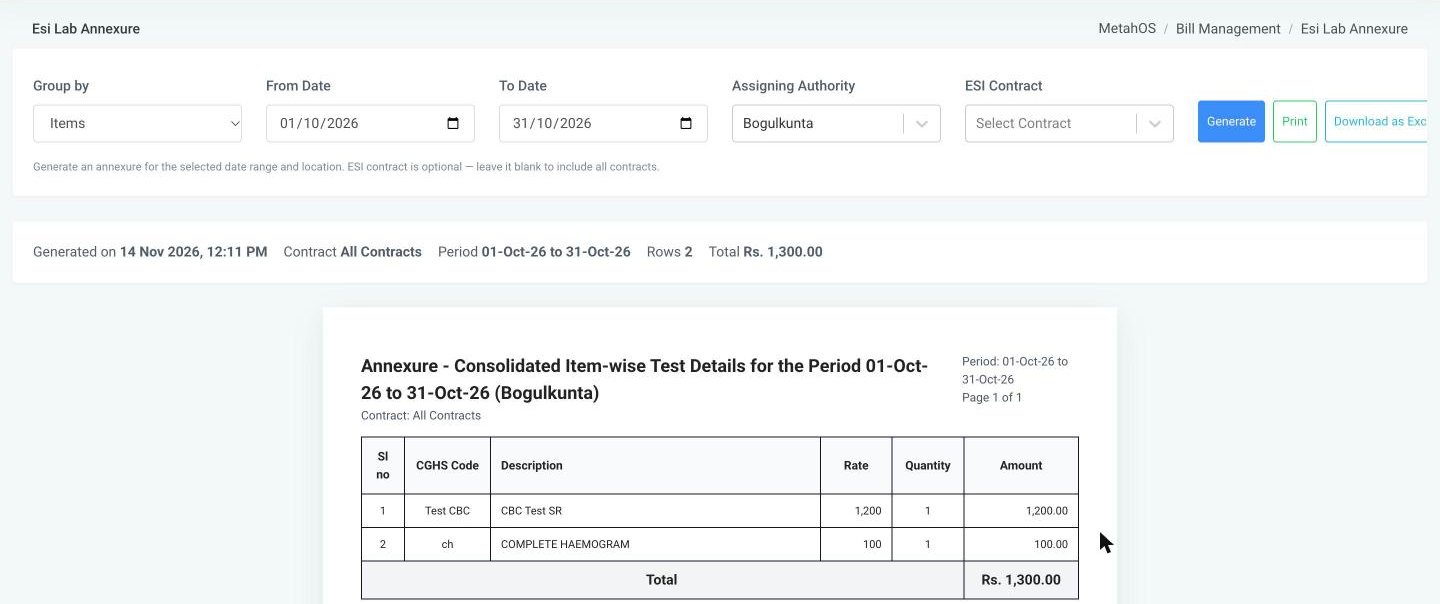
Items view
Titled Annexure - Consolidated Item-wise Test Details, with the columns Sl no, CGHS Code, Description, Rate, Quantity and Amount, and a grand total.
Bills view
One row per test on each bill, with Sl no, Date, Bill No, Patients UHID, Patients Name, Gender, Age, ESI Card Number, Doctor's Name, Test Name, Rate and Total Amount.
Printing and exporting
- Print prints the annexure page by page, with the period and page number on each page.
- Download as Excel saves the same rows as a spreadsheet.
Both work only after the annexure has been generated and has rows.
note
In earlier versions an ESI contract had to be chosen. It is now optional, so one annexure can cover all of a site's ESI work for the month.