Contract Invoices
Contract Invoices raises one invoice per month for each corporate contract at each site, covering everything billed to that contract in the month. Invoices for the previous month are generated automatically on the 1st of each month, and can also be run by hand. Open the list from IRMS → Contract Invoices.
At a glance
fa-hospital-o | Set up the site | Invoice prefix, GSTIN, billing address and bank details.
fa-file-text-o | Set up the contract | Legal name, payment terms and addresses.
fa-refresh | Generate | Automatically each month, or with Run.
fa-search | Find an invoice | By month, invoice number, site or contract.
fa-file-pdf-o | View or download | Invoice details and the PDF.
Before you start: site invoice details
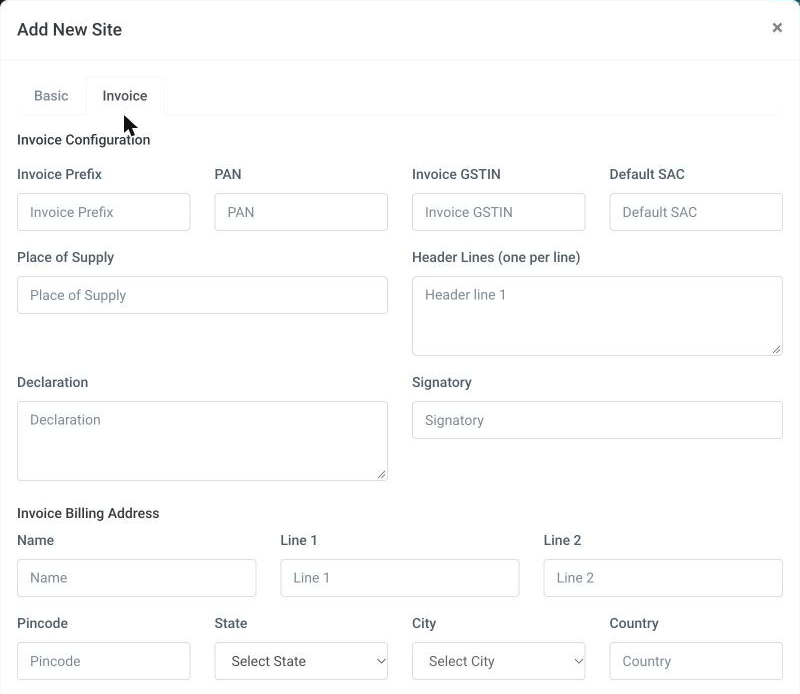
The invoice header, numbering and bank details come from the site. Open Facility → Site Management, add or edit the site, and fill in the Invoice tab:
| Field | Used for |
|---|---|
| Invoice Prefix | The start of every invoice number for this site. If left blank, the site code is used. |
| PAN, Invoice GSTIN | Printed on the invoice. Invoice GSTIN falls back to the site's GST In. |
| Default SAC | The SAC code printed against the services. |
| Place of Supply | Printed on the invoice. |
| Header Lines (one per line) | The lines printed at the top of the invoice. If left blank, the site name and address are used. |
| Declaration, Signatory | The declaration text and the signing authority at the foot of the invoice. |
| Invoice Billing Address | Name, Line 1, Line 2, Pincode, State, City and Country. |
| Bank Details | Account name, account number, IFSC, bank name and branch, printed for payment. |
Before you start: contract invoice details
On the contract (IRMS → Contract Management), the Invoice Details section holds the payer's Legal Name, Terms (Days), and Billing and Shipping addresses (tick Shipping same as Billing to copy it). The terms set the invoice's Due Date: invoice date plus the number of days.
What goes on an invoice
For the chosen month, an invoice collects every item on bills that:
- are billed to a corporate contract,
- were created in that month at that site,
- are not cancelled, and
- have not already been put on an invoice.
Items are grouped by site and contract, so each site–contract pair gets one invoice for the month. Once an item is invoiced it is never picked up again, and the bills on the invoice are locked so they cannot be changed afterwards. Trying to edit one shows Bill is locked because invoice <number> has been generated.
The Contract Invoices screen
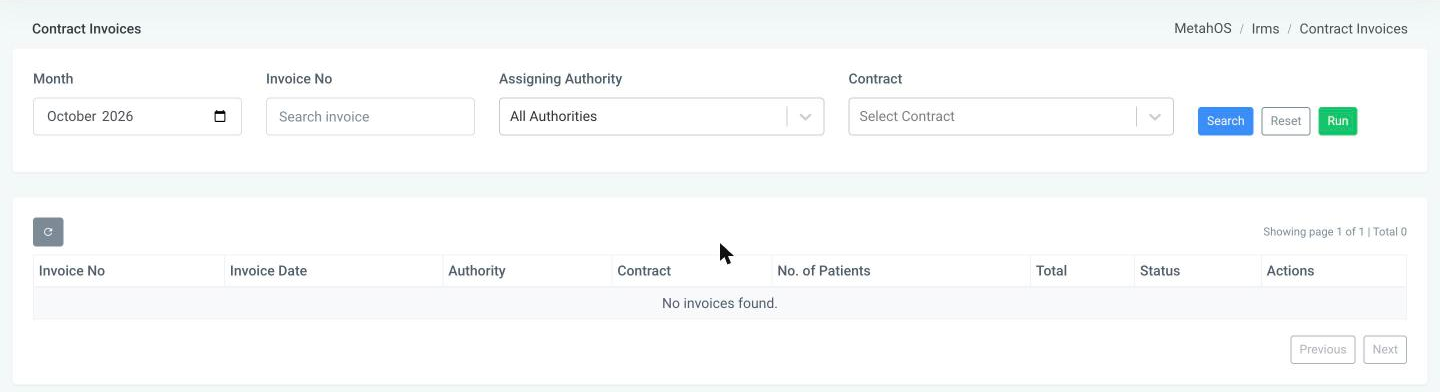
- Month defaults to last month. Narrow the list by Invoice No, Assigning Authority or Contract, then click Search. Reset goes back to the defaults.
- The list shows Invoice No, Invoice Date, Authority, Contract, No. of Patients, Total and Status, 20 invoices per page.
- View opens the invoice: its dates, the patients and tests on it, and the total. PDF opens the printable invoice.
Statuses
| Status | Meaning |
|---|---|
| Generating | The invoice is being built. |
| Generated | The invoice and its PDF are ready. |
| Failed | Something went wrong. Running the month again retries it. |
Running invoices by hand
Run generates invoices for the selected Month, for the selected authority or, if none is chosen, for all authorities. Invoices that were already generated for the same site, contract and month are left as they are, so running a month twice does not create duplicates.
caution
Running invoices locks the bills they cover. Make sure the month's billing is complete before you run it by hand.